Find and control the right version

Vindula brings files that are already digital into a corporate library with categories, search, permissions, versioning, validity controls, and history.

Existing digital files • Categories and metadata • Search • Version and validity

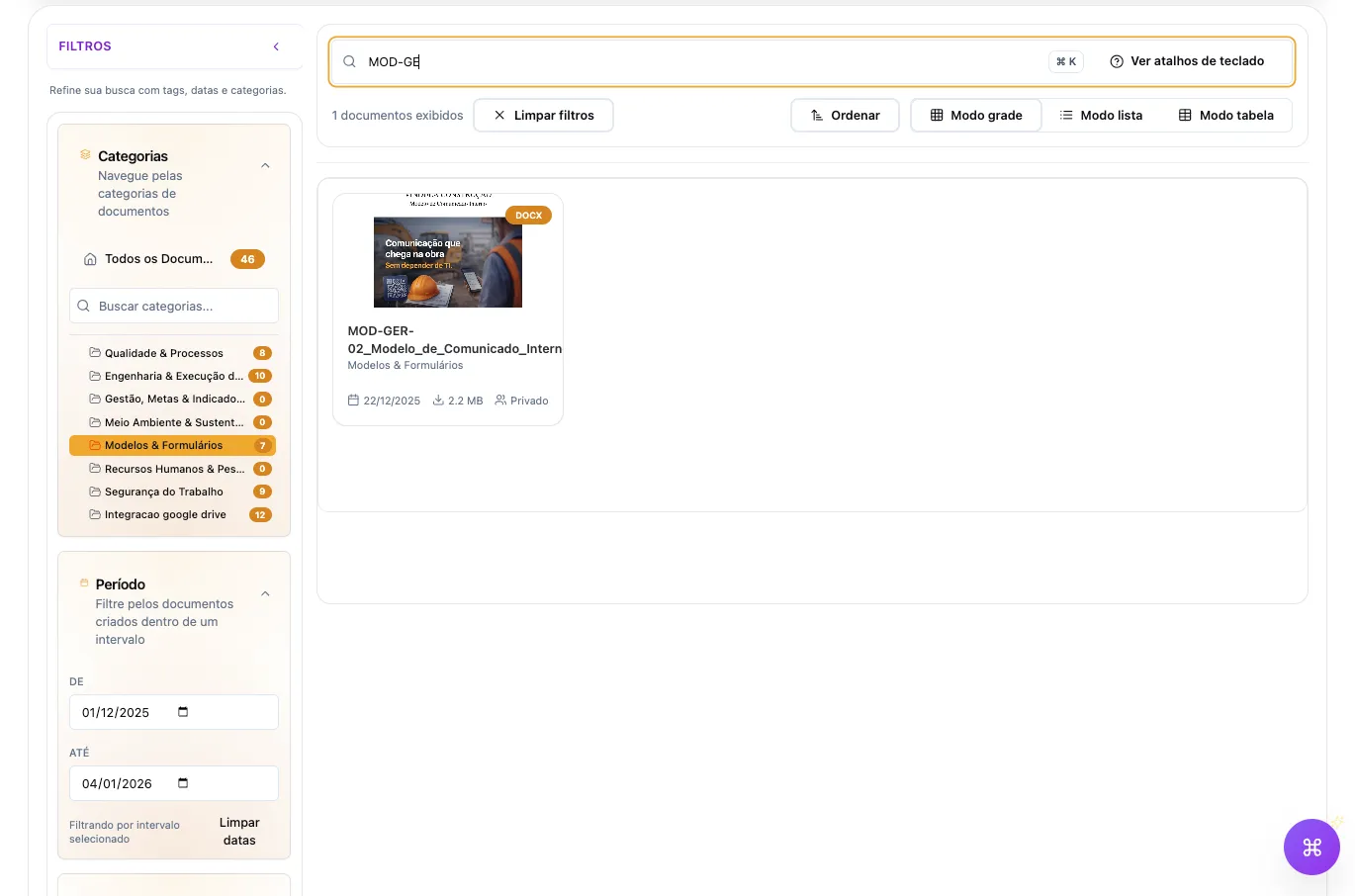
Document search by text, category, and date range in the Vindula Library

Search with filters and categories in a digital document repository.

Available capabilities

What Vindula provides for the digital repository

Current Library capabilities to organize, find, control, and distribute digital documents across the company.

Repository organization

Structure documents by category, context, and metadata to reduce reliance on filenames and loose folders.

  • Hierarchical categories

    Organize the repository in category trees with settings inherited by level.

  • Fields and tags

    Use custom fields and tags to classify, filter, and contextualize documents.

  • Curated collections

    Bring selected documents together in internal collections with manual ordering, search, and filters.

  • Record mode

    Group documents by an identifier field such as employee, contract, registration, project, or process.
Search and consultation

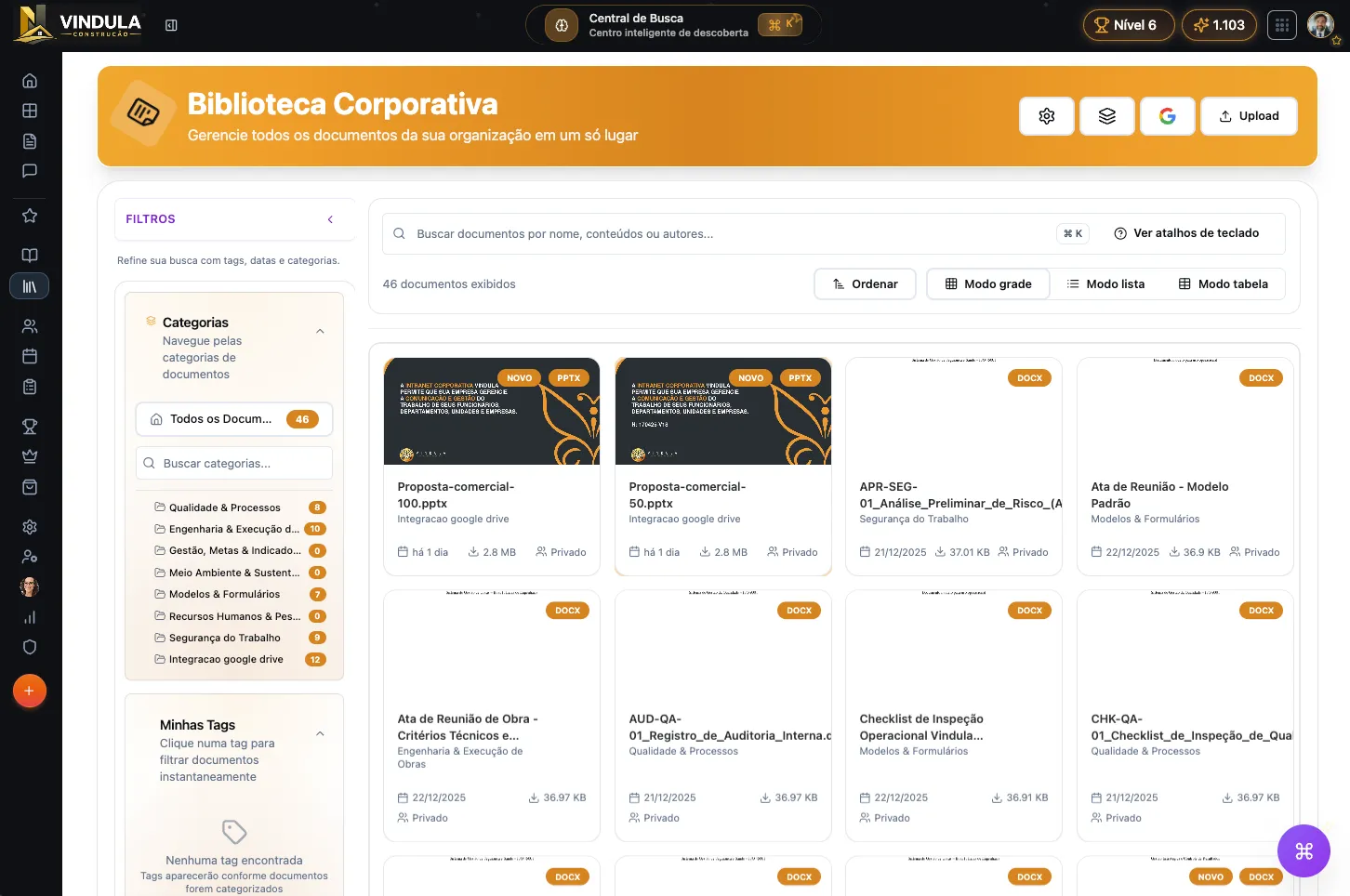
Find documents by name, category, fields, tags, and processed content, with viewing inside the platform.

  • Search with filters

    Combine text, category, tag, date range, and sorting to reach the right set of documents.

  • Searchable content

    Document processing extracts content to support search across PDFs and images.

  • Controlled viewing

    View PDFs, video, and audio in Vindula according to the defined permissions.

  • AI-assisted consultation

    When enabled, AI helps consult the content and provides references to the excerpts used in its response.

Document control

Keep version, validity, history, and access under control instead of treating each file as an isolated copy.

  • Version history

    Record new versions with date, author, and processing status.

  • Comparison and restoration

    Compare versions and restore a previous version as the new reference while preserving history.

  • Validity and expiry

    Configure validity globally, by category, or by document, with alerts and restrictions according to policy.

  • Permissions and audiences

    Control who can view, manage, share, or download documents and categories.

Distribution and connections

Connect the official document to reading, signatures, communication, and file providers when the workflow requires it.

  • Mandatory reading

    Link documents to obligations with audience, deadline, priority, and progress tracking.

  • Electronic signatures

    Connect documents to acknowledgment or signature flows with recipients, evidence, and tracking.

  • Feed and Chat

    Share Library documents in internal channels while respecting access rules.

  • Google Drive and Microsoft

    When configured, Google Drive, OneDrive, and SharePoint integrations support linking, importing, and synchronization.

Library in use

Organization and control visible in the repository

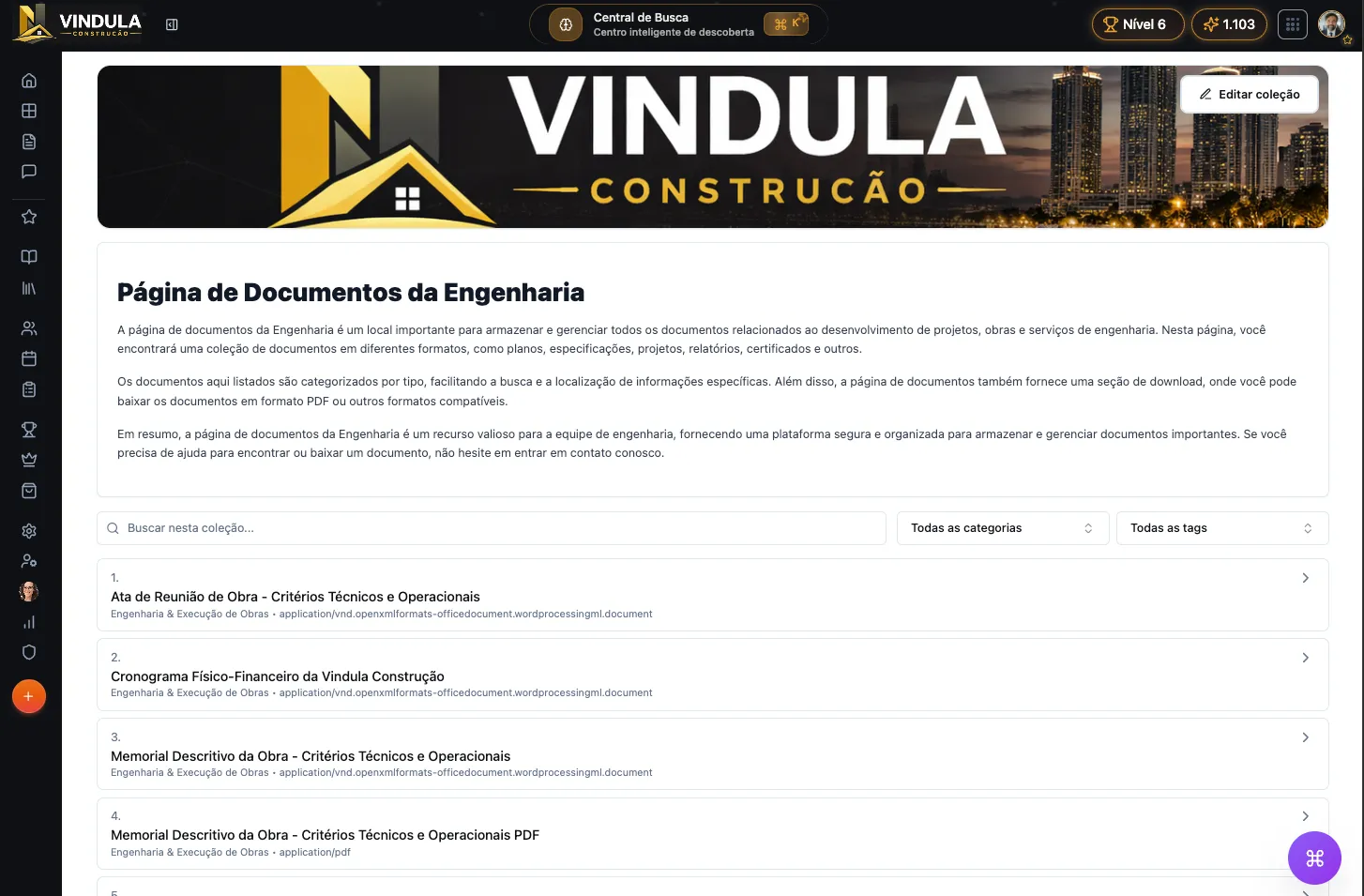
Engineering document collection organized in the Vindula Library

Collections for related documents

Selected documents can be presented in a collection with search, categories, tags, and ordering defined by the team.

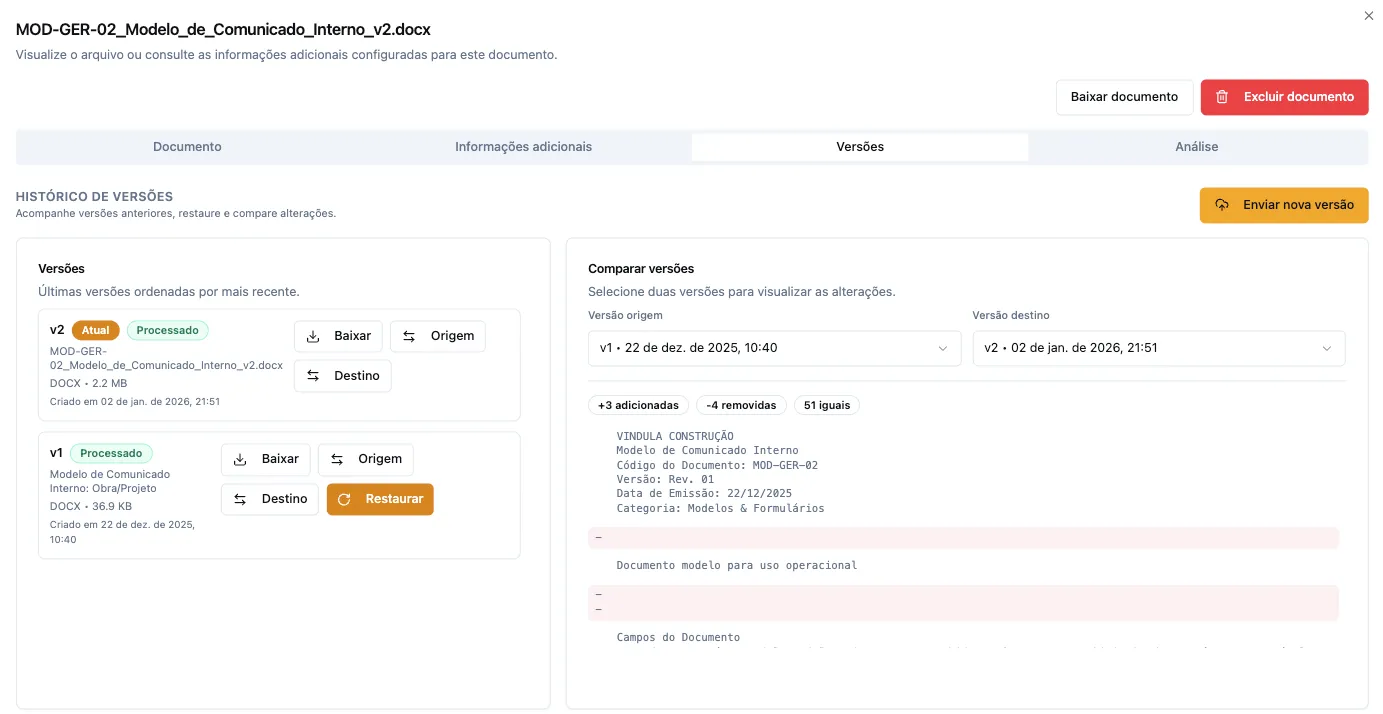
Document version history with comparison and restoration in Vindula

Version history and comparison

The team tracks the current version, compares changes, and can restore a previous version while preserving history.

Operational control

What the team starts controlling

The repository stops depending only on folders or filenames and starts bringing context, access, version, and validity together.

Structure existing digital files by category, field, tag, and collection.

Find documents by text, filters, and processed content.

Define who can view, manage, share, or download each item.

Track the current version, history, authorship, and document changes.

Configure validity, alerts, and restrictions for expired documents.

Group documents by employee, contract, registration, project, or another identifier.

Link documents to mandatory reading or signatures when evidence is required.

Connect external file providers to the repository when integrations are configured.

AI-assisted consultation

How AI-powered document analysis works

In the PDF viewer, users can request a summary, identify key points, or ask questions about the content. The answer is built from excerpts of that document and includes the references used.

01

Content prepared for consultation

Processing extracts text from the PDF so its content can be searched and used to answer questions.

02

Question focused on the document

Users can request a summary, key points, or action items and recommendations. The query retrieves only relevant excerpts from the open document.

03

Answer with references

AI identifies the excerpts used in its answer. If it cannot find enough content, it states that the document does not contain enough information to answer.

Assisted classification

AI can also support titles and fields

When configured, post-processing uses extracted content to suggest titles or fill custom fields defined by the company.

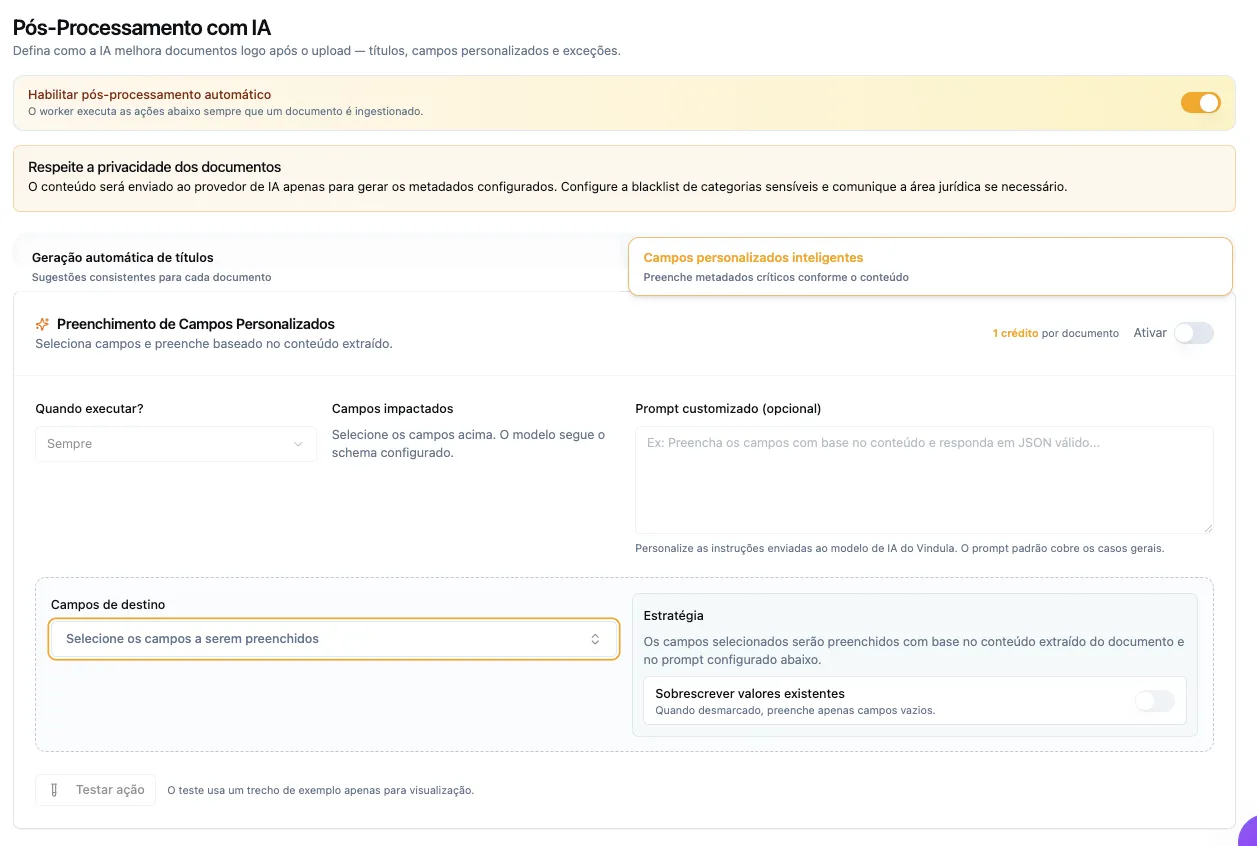
AI post-processing settings for titles and custom fields in the Vindula Library
Optional configuration for AI actions after document processing.
Availability and limits. Consultation requires enabled AI capabilities and a PDF with processed text. It follows the document's viewing permissions and supports reading; the original file remains the source for verification.

Where it fits best

Scenarios where the repository gains operational value

The fit is stronger when documents change over time, serve different audiences, or need to be found with context.

Policies and procedures

When policies, SOPs, and instructions need versioning, validity, audiences, and controlled consultation.

Multi-location operations

When departments, stores, projects, plants, or branches need to consult the same official source.

Documents by record

When the repository needs to be grouped by employee, registration, contract, project, or process.

Recurring official materials

When templates, manuals, and reference documents change over time and require history.

FAQ

Questions about the digital repository in Vindula

Direct answers about the current scope of the Library and the limits of this offering.

Does Vindula scan paper documents?

No. This offering covers the organization and management of files that are already digital. Physical scanning, transportation, storage, and disposal of paper documents are not current Vindula capabilities.

What makes up a digital repository in Vindula?

The Library brings documents, video, and audio together through categories, collections, custom fields, and tags. Content can have permissions, versions, validity controls, history, and links to other platform workflows.

Can users search inside documents?

Yes. Processing extracts content to support search across PDFs and images. When AI capabilities are enabled, users can also make assisted queries with references to the excerpts used in the response.

How is document access controlled?

Permissions define who can view and manage categories and documents. Sharing through Feed and Chat respects the original content access rules.

Does the repository replace Google Drive, OneDrive, or SharePoint?

Not necessarily. When configured, integrations can link, import, or synchronize content from these providers with the Library. The design depends on credentials, permissions, and the scope defined for the company.

How does repository organization begin?

The starting point is defining categories, fields, tags, audiences, and access rules. Files can then enter through upload or configured integrations, with processing and review inside the Library.

Does Vindula guarantee legal validity for every document?

No. Vindula provides organization, access control, history, mandatory reading, and signature workflows. The validity of each document or signature depends on the type of act, applicable rules, and the configuration adopted by the company.

See how your digital files can gain organization and control

In the demo, we show categories, search, permissions, versions, validity controls, and the configurable capabilities that fit your repository.