BPMS to move critical processes out of email and spreadsheets

Model approvals, purchases, onboarding, and internal requests in Cosmos with phases, fields, owners, files, and auditable history. Bring communication, documents, and training together in one place. Start with what matters most to your operation today.

Purchases • Onboarding • Internal requests • Files • History

Vindula BPMS editor configuring data and quote triage for purchase approval

Purchase approval with quote: request, amount, deadline, and file before manager decision.

Real use cases

Operational pains BPMS solves

This showcase starts from Cosmos flows: purchases with quotes, onboarding across HR and managers, internal requests with files and history.

Approvals lost in email

Purchases, reimbursements, and terms stop circulating through inboxes. Teams model Request created, Request registered, Data and quote triage, Manager approval, and Purchase released.

Lack of traceability

Each record shows current phase, owner, comments, files, transitions, and auditable history. Decisions stop depending on memory, spreadsheets, or lost messages.

Onboarding across HR, IT, and manager

Employee onboarding can combine required fields, attached documents, training, and owners per phase while keeping everyone in the same Cosmos.

Unstandardized internal requests

Quality, facilities, purchasing, and administration use forms per phase, fields such as amount, date, and file, plus permissions by user, group, and role.

Visual storytelling

Screens that place the user inside the process

The screens show operating context: emergency PPE purchase, onboarding notebook, data triage, manager approval, and released purchase.

Screen 01

Flow management in /bpms/admin/flows

The screen shows the active 'Purchase approval with quote' flow, with filters and quick access to details or map to review phases, fields, and history.
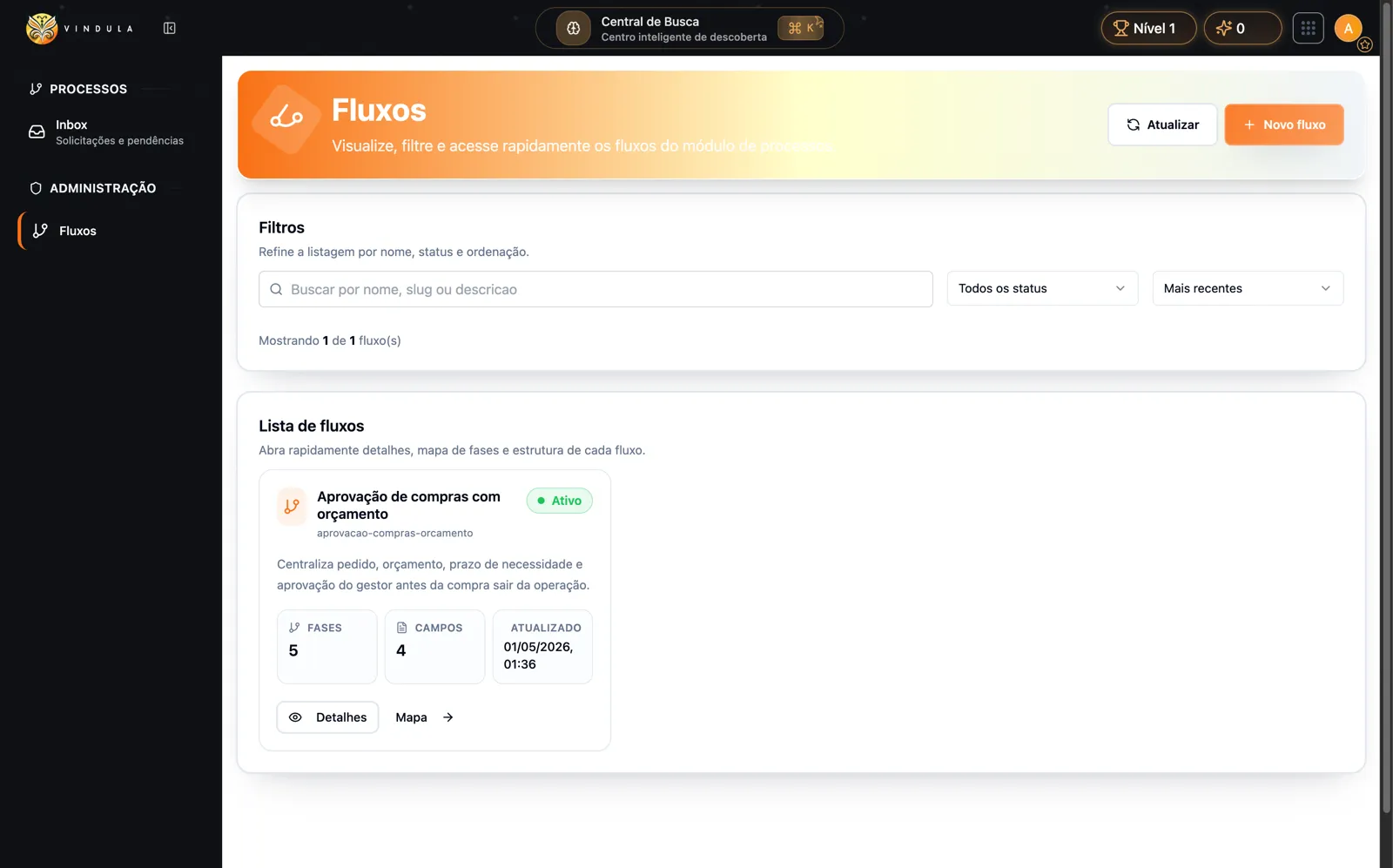
BPMS flow list in Cosmos with filters and purchase approval flow

Ideal context: a process manager checks which flows exist, how many phases/fields they have, and quickly opens details or map.
Screen 02

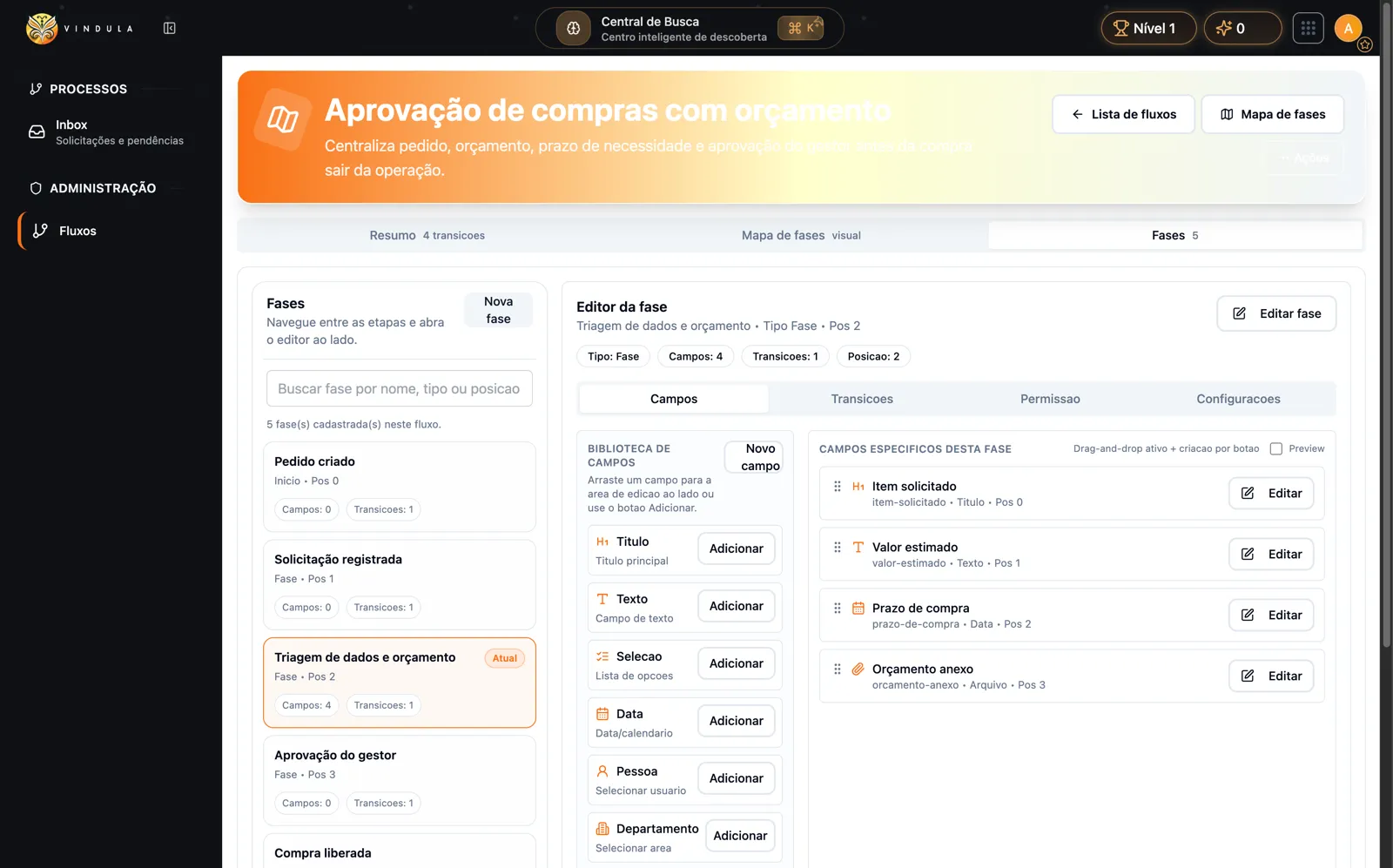
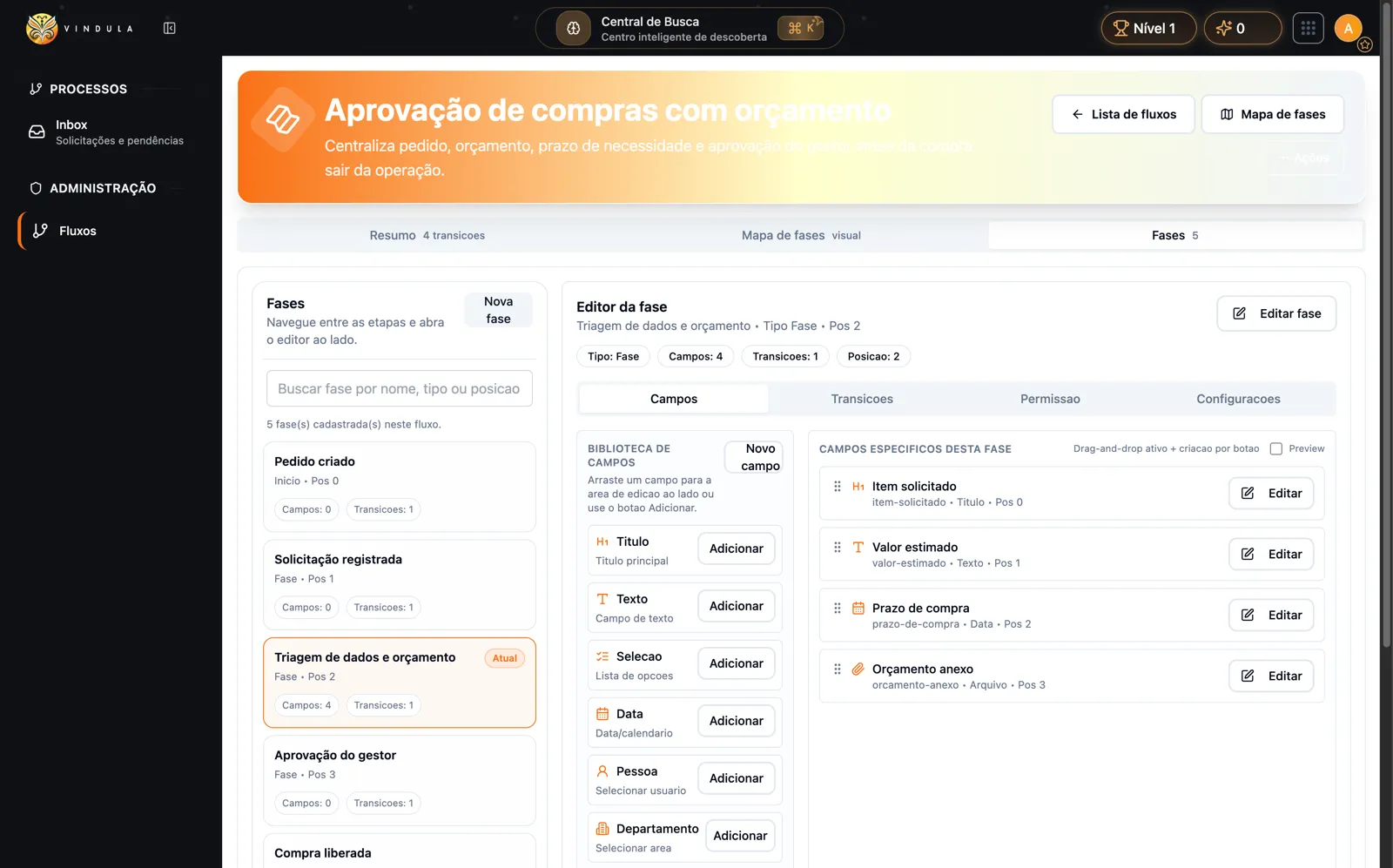
Data and quote triage

The phase asks for requested item, estimated amount, purchase deadline, and quote file before sending the decision to the manager.

BPMS phase editor with requested item, amount, deadline, and quote file fields

Ideal context: an analyst turns an informal approval into a controlled form with minimum data and evidence before the decision.

Screen 03

Inbox with pending records

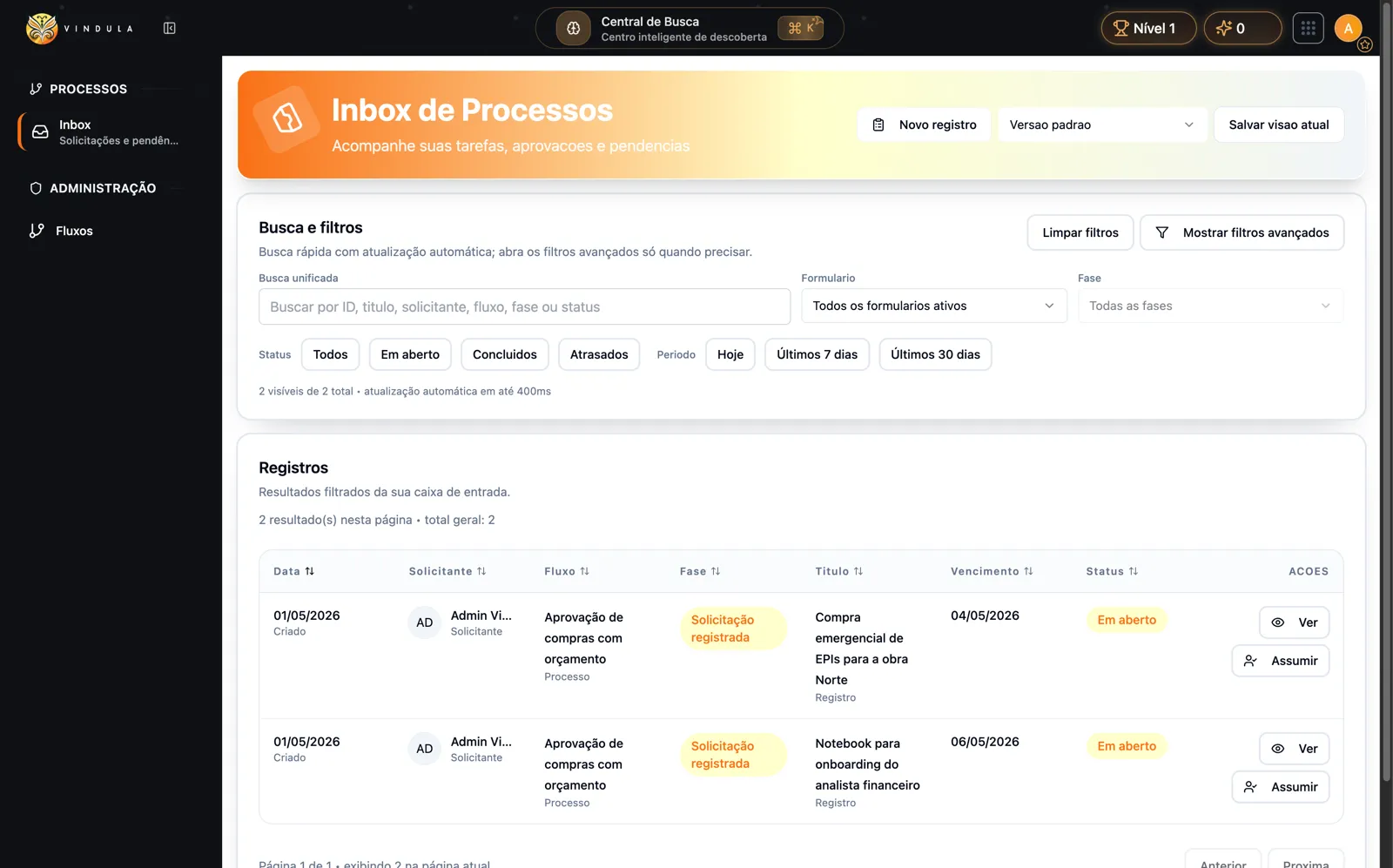
The inbox shows requests named from real operations: PPE for the North job site and an onboarding notebook, each with phase, deadline, status, and Assume action.

BPMS process inbox with purchase approval records and view or assume actions

Ideal context: the owner opens the inbox and sees what must be handled, without searching for approvals in side conversations.

Screen 04

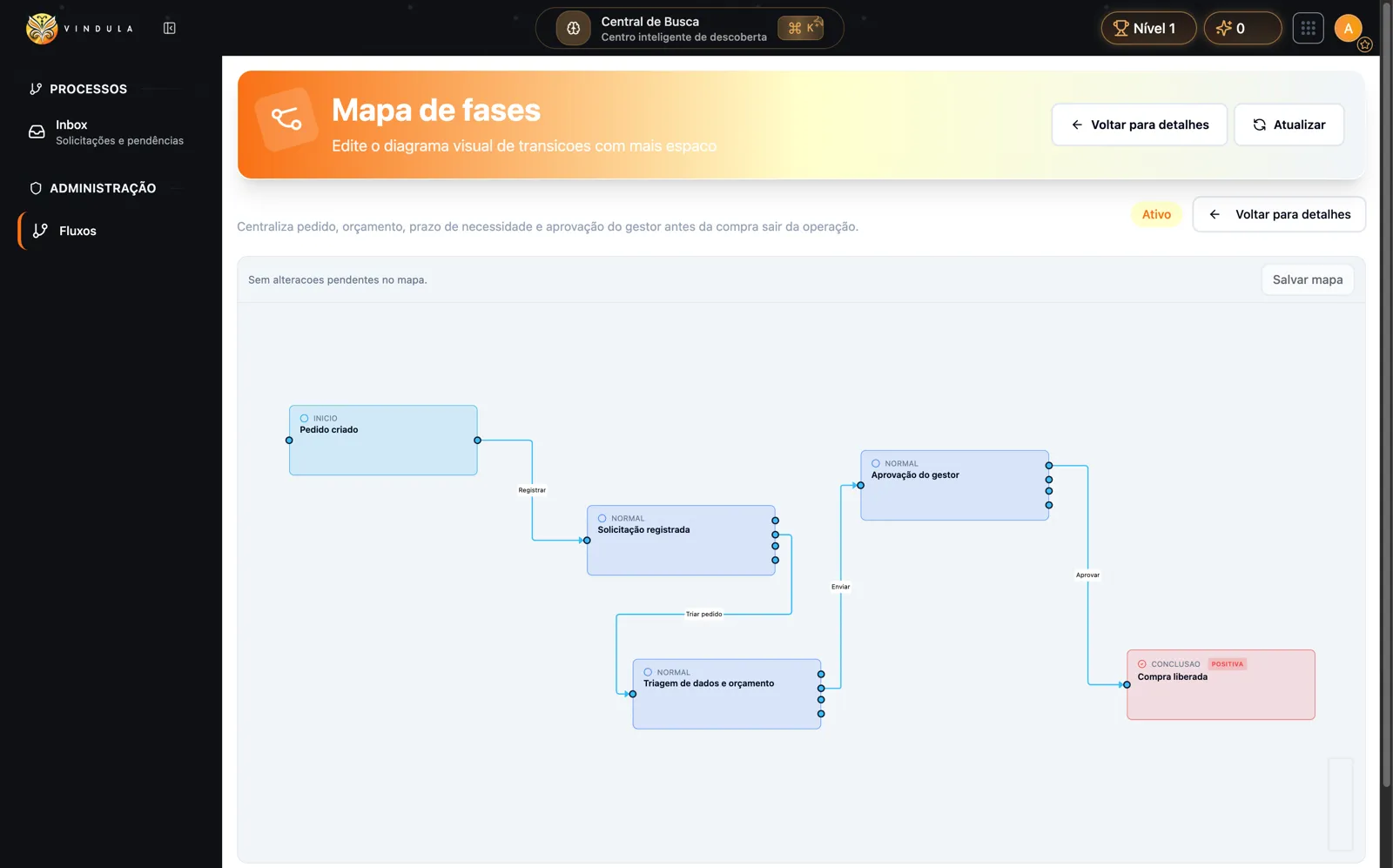
Visual phase map

The map organizes the real purchase path: request created, request registered, data and quote triage, manager approval, and purchase released.

BPMS visual map with request created, quote triage, manager approval, and purchase released

Ideal context: leadership understands the request path in seconds while the technical team keeps the structure editable.

Module capabilities

From flow design to inbox execution

BPMS combines visual administration, fields per phase, transitions, permissions, and operational records in a Cosmos Design System experience.

Flow modeling

Create flows with phases, fields, and transitions in Cosmos admin.

  • Management in /bpms/admin/flows

    List, filters, and actions in the Cosmos shell to review active flows, phases, fields, and map.

  • Process phases

    Steps such as request created, request registered, triage, manager approval, and purchase released.

  • Fields per phase

    Title, text, select, date, person, department, unit, corporate, and file fields according to flow needs.

  • Named transitions

    Actions such as register, triage request, send, and approve move the record between phases.

Operational execution

Track records, owners, and decisions in the process inbox.

  • Inbox

    Records by flow, phase, status, and period, with unified search and automatic refresh.

  • Assume record

    Authorized users assume ownership before handling pending work.

  • Comments and history

    Context, decisions, and phase changes stay together in the record.

  • Protected files

    Quotes, evidence, and record files follow the secure API/R2 flow.

Process governance

Permissions, audit trail, and visual map reduce context loss.

  • Flow permissions

    Access by user, group, process role, and secure tenant scope.

  • Auditable history

    Creates, assumes, comments, files, and transitions remain traceable.

  • Read-only map in the record

    Flow visualization helps reviewers understand where the request is.

  • Tenant audit

    Relevant events carry company, user, and operation context.

Operational control

What stops depending on memory, email, or spreadsheets

The value appears when each request has a current phase, owner, required fields, evidence, and decision trail inside Cosmos.

Replace loose approvals with records that have current phase, owner, and clear next step.

Define fields before the decision: requested item, estimated amount, purchase deadline, and quote file.

Track pending work by flow, phase, status, and period without a parallel spreadsheet.

Record comments, files, and transitions in the same process history.

Connect processes to documents, training, communication, and gamification without creating another isolated login.

Best fit

Start with the process that hurts most today

The best rollout does not start from a catalog. It starts from a visible flow with clear owners and direct operational impact.

01

Purchase approval

When amount, quote, deadline, and decision need to stay together from request to completion.

02

Employee onboarding

When HR, IT, manager, documents, and training need to follow a controlled sequence.

03

Quality and compliance

When evidence, acceptance, comments, and auditable history matter as much as approval.

04

Distributed operations

When different units need to follow the same flow without losing local context.

FAQ

Common questions before mapping the first flow

Answers to align scope: when to use BPMS, how it connects to Cosmos, and which limits to keep clear in the demo.

Does BPMS replace simple tasks?

No. Tasks solve simple execution with owner and deadline. BPMS fits when there are phases, fields, transitions, files, permissions, and history per record.

How does a team start with a real flow?

The safest path is to choose a visible operating pain, such as purchase approval with quote, and map phases, minimum fields, owners, and evidence before expanding to other processes.

Which field types appear in the flow?

The current flow works with title, text, select, date, person, department, unit, corporate field, and file, organized by phase.

How can we start without increasing cost and complexity?

Choose a high-friction process such as purchases or onboarding. The guided demo maps phases, fields, and owners inside Cosmos, avoiding a start with an isolated tool.

Are there external integrations and webhooks?

Not on this page. The positioning covers internal Cosmos processes: flows, phases, fields, records, files, comments, permissions, and auditable history.

Want to turn a lost approval into a traceable flow?

In the demo, we start from a real process in your operation and design phases, fields, owners, files, and engagement points in Cosmos.