Reporting channel with protocol, owners, and follow-up

Configure reporting channels, receive submissions with protocol, assign owners, and follow handling with messages, status, history, and indicators.

Configurable channels • Protocol • Owners • Messages • Indicators

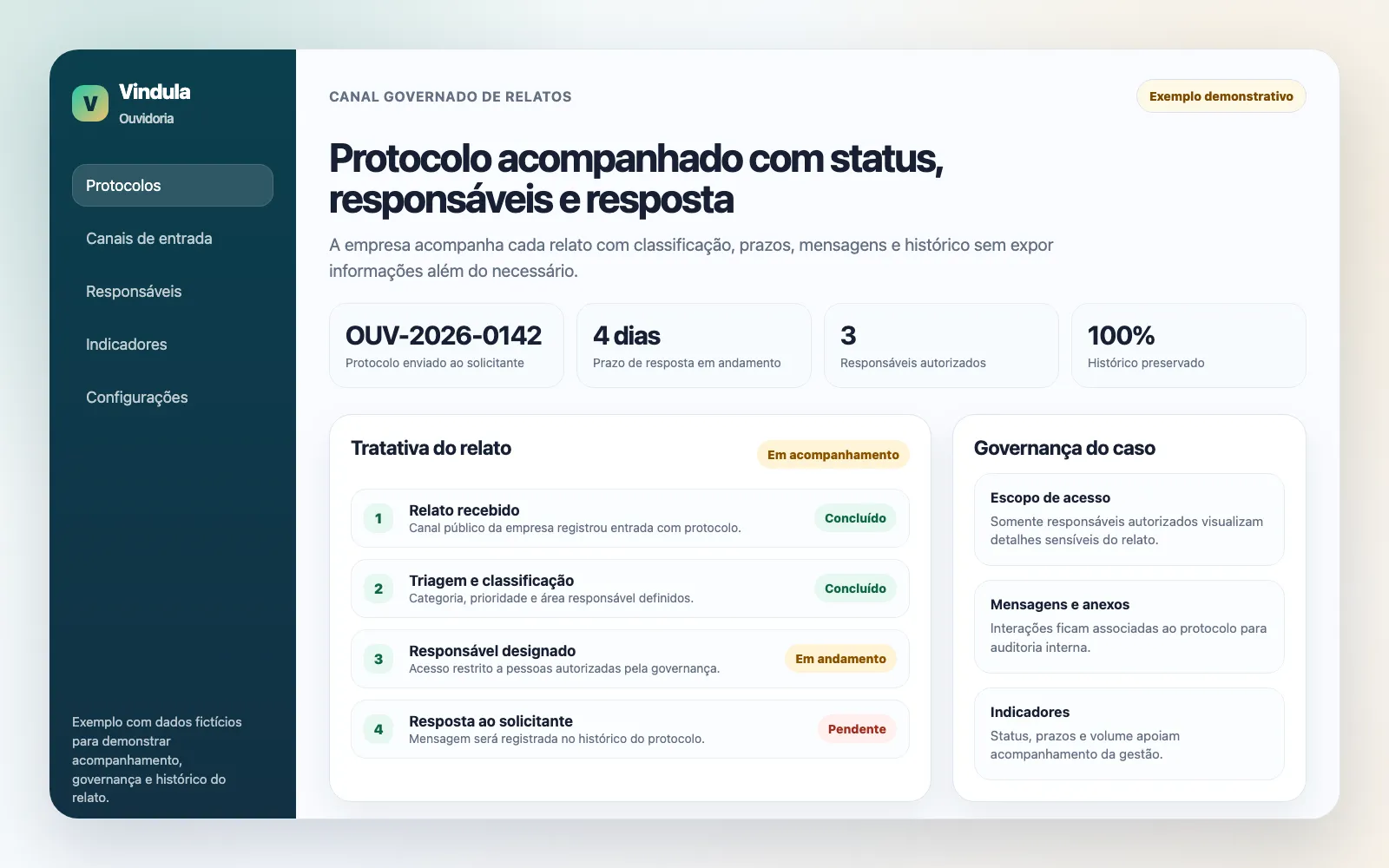
Illustrative example of an ombudsman protocol tracked with status, owners, and history in Vindula

Illustrative example: each protocol moves forward with status, authorized owners, and a history for responding to the requester.

Module capabilities

What the ombudsman channel software includes

The module organizes report intake, internal handling, access governance, and follow-up indicators.

Channels and protocol

The company configures reporting spaces, receives submissions, and provides a tracking protocol.

  • Ombudsman spaces

    Configurable channels by purpose, responsible area, or service scope.

  • Submission with protocol

    Each report receives an identifier for lookup and follow-up without relying on parallel contacts.

  • Anonymous flow when configured

    Reports can be received without exposing personal data when that design is part of the company policy.

  • Abuse protection

    The public channel can use protection against automated submissions and usage limits.

Case handling

The responsible area follows status, priority, owners, messages, and case history.

  • Case list and filters

    Operational view to query cases by status, severity, priority, space, owner, and period.

  • Owner assignment

    Cases can be assigned to people or teams to avoid ownerless handling.

  • Status and priority

    Tracking of opening, triage, progress, closure, and case urgency.

  • Case messages

    Public and internal communication history to keep handling documented.

Governance and security

Permissions, audit trail, and controls help restrict access and preserve evidence.

  • Role-based permissions

    Separated access to view, configure, assign, handle, and close cases.

  • Response templates

    Templates help standardize replies and guide the responsible area.

  • History and evidence

    Messages, files, protocol, and actions stay associated with the case.

  • Audit trail

    Audit records help sustain integrity and flow control.

Indicators and follow-up

Leadership follows volume, priorities, and points that require action.

  • Module KPIs

    Executive indicators support reading case volume and progress.

  • Critical cases highlighted

    Severity and priority help direct attention to what cannot stall.

  • Deadlines and SLAs

    Deadline tracking helps maintain triage and response cadence.

  • Owner-based lookup

    Owner and team filters help distribute handling workload.

Operational control

What the company starts controlling day to day

The gain is moving reports out of loose channels and placing protocol, owners, messages, and history in a governed flow.

Define which reporting channels are available for the company.

Provide a protocol so the person who submitted can follow handling.

Assign people and teams to each case.

Track status, priority, messages, and action history.

Separate who can view, configure, assign, handle, and close cases.

Use indicators to understand volume, urgency, and pending points.

Best fit

Where this module usually makes the most sense

Good fit comes when the company needs a formal channel, protocol, access governance, and visibility over handling.

01

Formal reporting channel

When the company needs to receive reports with a protocol and clear follow-up.

02

Compliance, HR, or legal

When sensitive areas need to handle cases with restricted access and documented history.

03

Multi-unit operations

When different units, audiences, or owners need the same control flow.

04

Governance and evidence

When handling needs to leave a trail, owners, and follow-up criteria.

FAQ

What usually comes up in ombudsman channel conversations

Objective questions to separate the software, the company’s operational channel, and governance responsibilities.

Is this the channel to submit a report?

No. Vindula provides the software so the company can configure and share its own reporting channel for employees or authorized audiences.

Does the module support anonymous reports?

Yes, when that design is configured for the channel. The company defines how reports are received, which data is requested, and who can follow cases.

Who can access cases?

Access depends on configured permissions and assignments. Operations can separate viewing, configuration, assignment, handling, and closure.

How does a person follow a report?

The submission generates a protocol for lookup. With it, the person can follow public case information and send messages when the flow allows it.

Does the software replace the compliance policy?

No. Vindula organizes the channel, protocol, owners, history, and indicators. The policy, investigation criteria, and decisions remain the company’s responsibility.

Want to see how to structure the ombudsman channel in Vindula?

The guided demo shows how to configure channels, permissions, owners, protocol, and follow-up according to your company design.