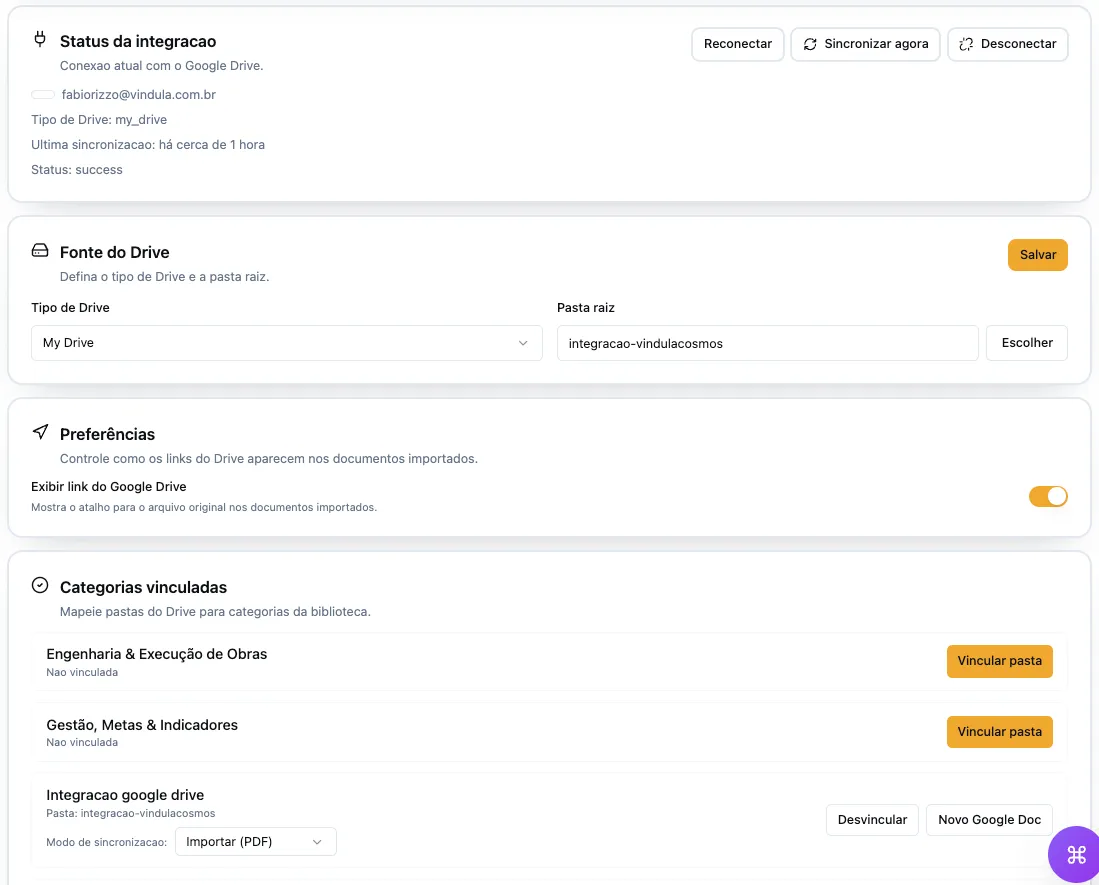
Google Drive connected to the company's official library

Drive folders and documents can appear in Vindula with categories, owners, and context so teams consult them in the official channel.

Google Drive • library categories • link or import mode • controlled sync

Vindula library integration screen with Google Drive

The integration helps keep Drive as the source without removing the document from the official consultation flow.

Integration in detail

What your company can organize

Understand what can be connected, who controls operations, and how governance appears in daily use.

Library and categories

Organize Drive from the categories the company already uses to guide consultation and document governance.

  • Category-level linking

    Library categories can point to specific Drive folders.

  • Link or import mode

    The company defines whether to keep the file as a governed link or import supported documents into the library.

  • Root folder organization

    The connection can start from a root folder to keep scope clear from implementation.

  • Drive creation when configured

    New documents can start in linked folders when the project includes that flow.

Sync and operations

Keep documents updated without turning Drive into a parallel source outside control.

  • Manual or scheduled sync

    Owners can sync folders at the pace operations require.

  • Processing report

    Failures, created documents, and updates stay visible for follow-up.

  • Source preserved

    Drive remains the source when that is the right design for the company.

  • Controlled manual uploads

    Linked categories can avoid manual uploads to preserve a single source.

Connection governance

Authorizations and permissions clarify who can connect, configure, and sync.

  • Google consent

    The connection goes through provider authorization and remains under administrative control.

  • Configuration permission

    The company defines who manages the connection, folders, categories, and sync.

  • Audit trail

    Connections, links, imports, and relevant syncs leave history.

  • Project-based scope

    Implementation starts with the categories and folders that truly need governance.

Operational control

What becomes clear for the company

The integration needs to reduce dispersion and clarify source, authorization, ownership, and day-to-day use.

Keep Drive folders inside an official consultation point without losing the file source.

Separate categories that only point to Drive from categories that import supported documents.

Reduce duplicate documents across channels and guide employees to the right reference.

Give visibility into failures, updates, imports, and sync owners.

Connected to the platform

The integration gains value when it appears in the flow of work

Documents, reports, and connected routines need to support communication, document management, knowledge, and HR with the same official reference.

Best fit

When it makes sense to prioritize this integration

The decision should start from where information lives today and how it needs to reach employees with context.

01

Google Workspace already adopted

When the company already uses Drive but needs to govern access and consultation inside the intranet.

02

Folders by area

When each area keeps its own folders and an official consultation library is missing.

03

Policies and procedures

When documents need category, owner, history, and contextual communication.

FAQ

Common questions before the demo

Objective answers to align expectations about scope, authorization, and governance.

Does Vindula replace Google Drive?

Not necessarily. Drive can remain the file source while Vindula organizes context, categories, consultation, and governance.

Does the integration import documents?

It can import supported documents when that mode is defined in the project. It can also use governed links to preserve the file at the source.

Who manages the connection?

The company defines authorized administrators to connect Google Drive, select folders, link categories, and run syncs.

Want to validate this integration in your company scenario?

The guided demo shows what makes sense to connect first, which permissions enter scope, and how the integration supports operations.